Wednesday, July 31, 2013
My bunny broke Maya
Rabbit fall test 2 from Alessandra Waste on Vimeo.
Sorry I've only updated once in the last week. Been busy busy busy, as is to be expected.
Here's the sequence I've been working on the last two days. Most of one, however, was spent trying to figure out how to break the floor. First I tried to run a shatter effect, then have a gravity field just pull the pieces down. It went terribly for numerous reasons. I ended up just breaking up the pieces by hand and keying each individually. The look is a little different, but I've grown to like it. Before I was trying for a natural-looking crumble (and failing miserably). This looks more like the program itself is breaking, which fits in with the theme of the piece, so... great!

Tuesday, July 23, 2013
no sleep for computers
Yesterday I set two computers to render some sequences overnight. When I came in this morning, one was done and one wasn't. I cancelled the unfinished batch and set it up on another computer where it's been going all day so far. I had to redo the whole sequence anyway because the UVs on the ground were messed up for some unknown reason, so I would have had to redo it anyway. Hopefully it'll be done by the time I come in tomorrow...!
Above is the sequence that actually finished rendering. I used mental ray & Preview: Final Gather because it makes the sand and stones look really nice; I just couldn't get it quite right otherwise, also the trees looked off and this softens them a little bit.
When I render individual frames from Maya, the sky appears blue as it does in the program with physical sun and sky. When I batch render, however, it interprets the sky as transparency. At first this irked me, but then I realized I could composite in one of the Joshua Tree sky panoramas that I wanted to use in the first place but looked stretched, pixelated, or a little too Uncanny Valley when I placed it in Maya as an image plane or environment sphere. I think it looks better this way, actually! Unexpected silver lining!
Thursday, July 18, 2013
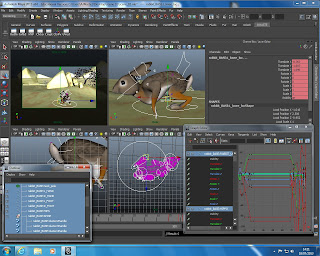
hopping along
Today is all about animation, much like tomorrow and the next few weeks. Here's a screen grab of all the windows that I juggle while getting this little dude to jump around. He's running off toward the rocks. I'll pop out a playblast at the end of the day since, as we discovered last night, rendering takes so long.

Wednesday, July 17, 2013
Python and Rendering
I set out to play with scripting in Python this morning and explore some possibilities for the cave sequence where reality is revealed to be broken and sort of "Matrix"-like. Unfortunately, it started seeming like a lot of trouble and after a little while I relented. Maybe I'll just do those backgrounds in AfterEffects and then add in the characters when compositing. That could add some interesting layers to the reality of the piece, while also keeping render time down from Maya. Speaking of rendering, I don't have much to show you right now because I've been sitting here for the last two hours waiting for a sequence to render. I wanted to do a 70-frame shot fully rendered out just to see how long it would take. I'm glad I did! Knowing it takes so long to render will definitely help me determine whether or not to do more or less of the cave sequence in AfterEffects and also plan out my final render in a month's time. Hopefully I'll be more able to render scenes as they're completed, leaving them to work overnight and then moving on to the next in the morning. That way I (hopefully) won't get caught out at the end.
Friday, July 12, 2013
save the environments
I kept tweaking the sets today. Here's a render with mental ray and a physical sun and sky.

I tried a few versions first with Image Based Lighting but something just looked... off...
The difference between the photorealistic HDRI behind the almost-sort-of-real-looking rocks was a little too jarring for me. I also tried one with a fixed image plane, but that had the same problem. This was a really pretty landscape I wish had worked:

rabbit in the rocks

Thursday, July 11, 2013

Tuesday, July 9, 2013
problems fixed and snake painted
I had some problems with the rabbit rig yesterday that carried over into today. But I fixed it this morning! Weird things were happening with the combination of the rig, blend shapes, and other cluster deformers. Ended up being a combination of the hip pole vectors going insane (as they do) and one of the clusters on the spline spine whacking out. The pole vectors were straightforward enough to fix once I figured out that they were to blame, but I still don't know what went wrong with the highest spine cluster. I just had to detach the skin, delete history, and reattach it. So now one spine cluster is a little lower than the others, but it still functions the same way and doesn't effect the rig in any noticeable way. After that, the new blend shape I made (for the millionth time) from a newly duplicated skin mesh worked fine.
After giving up yesterday, though, I instead spent time painting the snake and it looks FABULOUS. I think there will be two snake puppets: one for slithering/sidewinding and one for posing and more nuanced movements. The slithering snake uses two nonlinear sine deformers and was surprisingly simple with beautiful results. Right now I'm working on the posing snake. It has a joint skeleton and a retractable mouthpiece with some killer fangs that swing out when the jaw opens.
I'll put up some pictures at the end of the day.
Edit: Look! A picture!
The colors look a little off, but that's just from the default render settings...

After giving up yesterday, though, I instead spent time painting the snake and it looks FABULOUS. I think there will be two snake puppets: one for slithering/sidewinding and one for posing and more nuanced movements. The slithering snake uses two nonlinear sine deformers and was surprisingly simple with beautiful results. Right now I'm working on the posing snake. It has a joint skeleton and a retractable mouthpiece with some killer fangs that swing out when the jaw opens.
I'll put up some pictures at the end of the day.
Edit: Look! A picture!
The colors look a little off, but that's just from the default render settings...

Subscribe to:
Posts (Atom)